Tctc Vertical Top Nav Logo
Skip to Footer Section

Payment Methods

Pay online icon

Online

Pay online using credit or debit via the MyTCTC portal by following these steps:

  • Go to and login to your MyTCTC account.
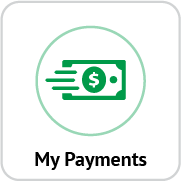
  • Click on the ‘My Payments' tile.

My Payments Tile on MyTCTC

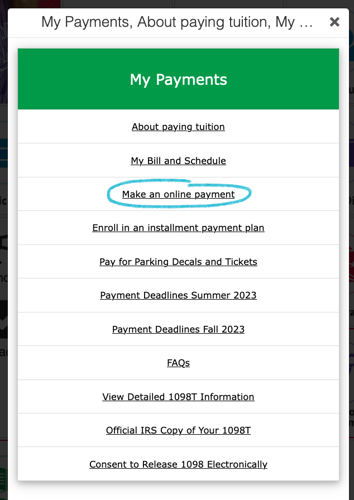
  • Click on the ‘Make an online payment’

window showing the My Payments Tile on MyTCTC. Make an Online payment link is circle to show where it is located.

  • TCTC accepts Visa, Discover, MasterCard and American Express. Please note that credit/debit domestic card payments incur a 2.95% service fee and international cards incur a 4.25% service fee. The minimum service fee for card transactions over $20 and less than $106 is $3.
  • You may pay by eCheck and NOT incur a 2.95% or 4.25% service fee.
paying in person icon

In-Person

You able to pay in person with cash or a check.This option is available at the cashier window is in Ruby Hicks Hall on the Pendleton Campus or at the front desk on our community campuses (Anderson, Easley and Oconee).

pay by mail icon

Mail

Payments must be received by the specified time on the payment due date, not simply mailed. Be sure to include your student ID number (T-number) on your check, and make your check payable to TCTC.

Send payments to:
Tri-County Technical College
Attention: Business Office
P.O. Box 587
Pendleton, SC  29670

If you are using an overnight delivery service, send payment to:
Tri-County Technical College
Attention: Business Office
7900 Highway 76
Pendleton, SC  29670

education piggy bank icon

College Savings Plan

You can pay with your 529 College Savings Plan. Contact your 529 plan’s administrator and they will provide you with instructions on how to authorize a withdrawal from your plan. Please submit your request to the 529 plan administrator three to four weeks before the payment due date. The time to process the payment can vary depending on the financial institution. 

Payments that are submitted by 529 savings plans should be mailed directly to:
Tri-County Technical College
Attention: Business Office
P.O. Box 587
Pendleton, SC  29670

payment plan icon

Payment Plan

TCTC offers curriculum students an interest-free term-based payment plan in partnership with CashNet. This allows for all or a portion of college costs to be spread out over either three or four months (May-July for Summer; August-November for Fall; and December-March for Spring).

Your payment can be automatically drafted from your bank account or credit/debit card if you elect that option.

There is a flat, non-refundable enrollment fee of $30 to set up the plan each term. There is a $30 returned payment fee if a payment is returned.

Payments are processed on the established dates when enrolling and will continue for the duration of the enrolled payment plan. The payment plan options vary based on the Target Dates to Enroll. Learn more at Online Payment Plan.

Enroll in a payment by following these steps:

My Payments tile icon

  • Click on the ‘Enroll in an installment payment plan’

Enroll in an installment payment plan link circled under My Paments list in MyTCTC screen shot

authorization icon

Authorized Person(s)

Students can invite parents, grandparents, and anyone else to pay their tuition bill. Follow the instructions below to add an authorized person to your tuition bill. 

    • Simply log into your MyTCTC account
    • Click on the “My Payments” tile

My Payments tile icon

  • Click “Make an Online Payment” link.

Manke an online payment link circled in My paments list in MyTCTC

  • Click on “My Account”
  • Select “Send a Payer Invitation” 
  • Fill in the required information

My Account screen shot   Send a payer invitation link screen shot


That person will receive an email with a password and a link, which they will use to access your payment page.